Custom workflows for SMEs with a mobile workforce

Built in weeks, without replacing your ERP

Turn enquiries, quotes, jobs, field updates, proof of work and payments into one connected flow for the office, mobile workforce and customer.

See practical examples
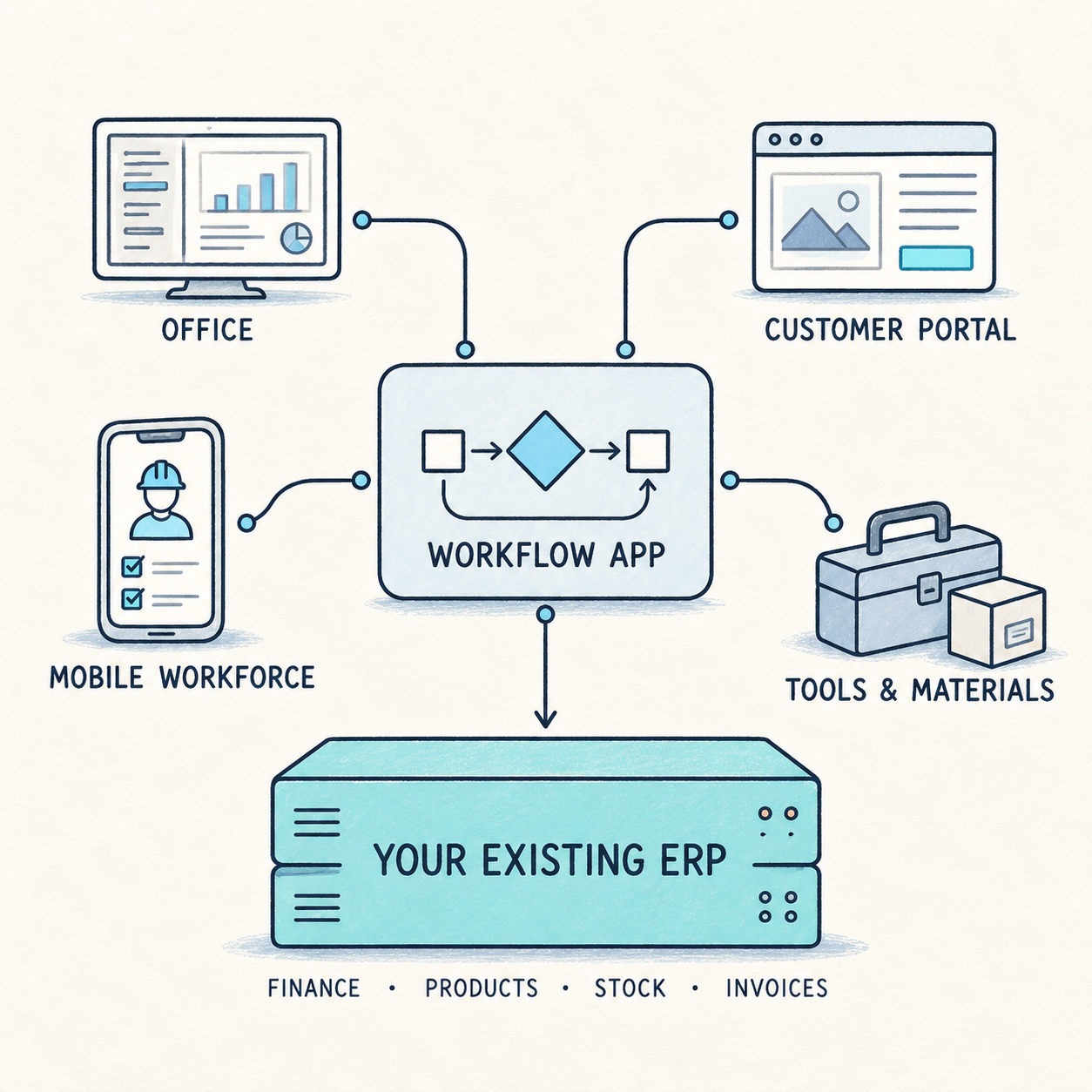
A workflow app connects the office, customer portal, mobile workforce, and tools and materials while the existing ERP remains the system of record for finance, products, stock and invoices.

The core idea

Keep your ERP. Get the workflows you need—in weeks, at a fraction of the traditional cost.

Your ERP remains the system of record for finance, products, stock and core data. An AI-assisted workflow application sits around it, turning enquiries, documents and field updates into structured actions while giving your mobile workforce the tools and customer experience your ERP was never designed to provide.

  • Increase operational efficiency
  • Get the tools your business actually needs
  • Gain real-time control of operations
  • Reduce operational errors
  • Deliver a better customer experience
  • Reduce IT costs

Examples of applications custom-developed to meet your needs.In weeks, not months.

Start with the workflow that costs the most time, causes the most duplicate entry or gives customers the least visibility.

From customer enquiry to scheduled job

A customer calls, emails or completes a website form. Instead of collecting details across inboxes and calendars, the office creates a branded quote from a service catalogue. When the customer approves, the quote becomes a planned job—with the right worker or crew, materials and checklist.

Result: faster quotes, fewer missed leads and no duplicate office-to-field data entry.

Make sure workers arrive with the right materials and tools

Before a worker or crew is dispatched, the application checks the job requirements against available materials, vehicle stock and equipment. It flags missing items, triggers a reservation or collection task, and records what has been loaded before the team leaves.

Result: fewer aborted visits, less idle time on site and fewer delays caused by missing materials or the wrong tools.

Replace an Excel process with a connected task flow

A material request, site handover, approval or service follow-up no longer has to pass between spreadsheets, emails and the ERP. The workflow gives the right person a task, captures the decision or action, and updates the relevant record without duplicate entry.

Result: clear ownership, faster approvals and a live view of every request instead of a version-controlled spreadsheet.

Give every mobile worker a complete job on their phone

Construction workers, field staff, drivers, inspectors and subcontractors see today’s jobs, navigation, customer history, instructions, materials and checklists in one mobile workflow. They update travel, arrival, work status and completion, while capturing photos, notes, parts used and requests for extra work on site.

Result: fewer calls to the office, fewer wasted trips and a clear record of what happened at every job.

Let customers follow and approve work without calling

A branded portal can show appointment status, staff ETA, progress, photos, documents and job history. Customers can approve changes, sign off work and access warranty documents or invoices without chasing the business.

Result: fewer status calls, stronger customer trust and clearer approval of scope and cost.

Get in touch to find out more

Get in touch

What changes in practice

One shared flow replaces the daily chase.

Before

Disconnected tools and constant follow-up

Enquiries, spreadsheets, emails, WhatsApp messages, paper notes and ERP entries are disconnected. The office chases workers and crews. Customers chase the office. Information is entered more than once.

After

Every job moves forward in one connected workflow

The office, field team and customer each see the information relevant to them, at the right time.

  1. Enquiry
  2. Quote
  3. Approval
  4. Schedule
  5. Field work
  6. Proof
  7. Payment

Start small

Improve one high-friction process first.

A tailored application does not need to automate everything on day one. Start where delays, duplicate entry or poor visibility have the highest operational cost, then add forms, integrations and customer-facing features as the workflow proves its value.

  • Service request → quote → approval
  • Quote → job planning → worker or crew dispatch
  • Field work → photos → customer sign-off
  • Material request → approval → job handover
  • Extra work → customer approval → updated invoice
  • Recurring maintenance → scheduling → proof of service

Built around your trade

One operating model. Configured for your business.

The workflow can use your own service catalogue, terminology, job templates, checklists, documents, pricing rules and approvals.

  • Construction, building and site operations
  • Electrical, plumbing and HVAC
  • Property maintenance and multi-trade repairs
  • Solar, EV charging, security and low-voltage systems
  • Equipment and appliance repair
  • Cleaning and facilities services
  • Landscaping, irrigation and seasonal maintenance

Full capability list

A workflow platform for the office, field team and customer.

Lead and CRM

  • Website enquiry forms and quote-request widget
  • Customer, company, contact and service-location records
  • Sales pipeline from new lead to won or lost
  • Call notes, email history, appointments, tasks and reminders
  • Lead source and marketing attribution
  • Customer history, service history and communication timeline
  • Follow-up automation for unanswered enquiries and dormant opportunities

Service catalogue and quoting

  • Configurable services, labour rates, materials, units, taxes and margins
  • Price books by vertical, region, customer type or contract
  • Quote templates with optional and add-on services
  • Photo-based quote requests and site-survey data capture
  • Quote PDF, email or SMS delivery and online approval
  • Deposits, expiry dates, revisions, discounts and change orders
  • Terms, warranties and acceptance conditions
  • AI-assisted draft quotes from descriptions and photos, reviewed by a person

Jobs and tasks

  • Automatic conversion of an accepted quote into a job or work order
  • Job templates with tasks, checklists, dependencies and expected durations
  • Planned, assigned, travelling, in-progress, blocked, review and completed states
  • Required task fields, notes, photos, videos and documents
  • Before-and-after evidence
  • Quality-control and manager approval stage
  • Customer signature and completion or acceptance protocol
  • Extra-work and change-approval workflow
  • Job, customer, site and asset history in one record

Workforce and scheduling

  • Worker, crew and subcontractor profiles
  • Skills, certifications, territories, availability and capacity
  • Drag-and-drop dispatch calendar
  • Assignment based on skill, capacity, location and availability
  • Daily worker schedule, route and appointment details
  • Start, finish, travel and onsite time tracking
  • Optional, consent-based live location sharing
  • Absence, leave, overtime and workload planning
  • Teams, subcontractors and work packages
  • Route optimisation and travel-time-aware planning in an advanced version

Mobile workforce app

  • “My jobs today” view
  • Navigation to the customer site
  • Job instructions, checklists, service history and customer details
  • Travel, arrive, start, pause, block and complete actions
  • Photo, video, note and signature capture
  • Parts and materials used on site
  • Extra-work, support and rescheduling requests
  • Offline work with later synchronisation
  • Push notifications for new or changed jobs
  • Customer-facing proof of work generated from field updates

Customer portal

  • Online quote viewing and approval
  • Appointment date, worker or crew ETA and job status
  • Real-time job progress and activity timeline
  • Task status, photos, documents, changes and messages
  • Approval of additional work and change orders
  • Deposit and invoice payment
  • Warranty, service report and acceptance-document downloads
  • Follow-up, warranty repair and recurring-service requests
  • Branded experience for each SME

Materials, tools and logistics

  • Parts and materials required per quote and job
  • Inventory by warehouse, vehicle and mobile crew
  • Material reservation when a job is scheduled
  • Reorder thresholds and supplier purchase orders
  • Delivery planning to sites, workers and crews
  • Barcode or QR scanning for loading and delivery confirmation
  • Missing-item and substitute-item workflow
  • Tool and equipment allocation, maintenance and return tracking
  • Vehicle and van-stock visibility

Finance and operations

  • Deposits, invoices, payments, refunds and overdue balances
  • Worker, crew and subcontractor payout tracking
  • Cash, bank, expenses and job profitability
  • Planned versus actual labour and material cost
  • Change-order profitability
  • Accounting-system integration
  • VAT, tax and multi-currency support
  • Job-level margin, cash-flow and outstanding-balance visibility

Website and communication

  • Branded public website for each SME
  • Service pages, local-area pages, projects, case studies and reviews
  • Online booking, lead-capture and quote widgets connected directly to CRM
  • Customer login and live project or job-status widget
  • Email, SMS, push and WhatsApp notifications where appropriate
  • Automated follow-up for quotes, appointments, payments and review requests
  • Project galleries and proof-of-work content for marketing

Management reporting

  • Lead-to-quote and quote-to-sale conversion
  • Revenue, margin, cash collection and sales pipeline
  • Worker and crew utilisation, travel time, productivity and capacity
  • Job completion, delays, revisits, callbacks and warranty claims
  • SLA compliance and customer satisfaction
  • Stock consumption and material variance
  • Branch, team, region, service-category and customer-segment reporting
  • Repeat-service and customer-lifetime-value indicators

Next step

Which workflow would make the biggest difference to your business?

A short conversation can identify where tailored workflow applications could reduce manual work, improve field productivity, accelerate quoting or give customers better visibility—while keeping your existing ERP in place.

Book a demo